> For the complete documentation index, see [llms.txt](https://docs.domino.run/docs/llms.txt). Markdown versions of documentation pages are available by appending `.md` to page URLs; this page is available as [Markdown](https://docs.domino.run/docs/misc/how-to-enable-developer-mode-on-discord.md).

# How to Enable Developer Mode on Discord

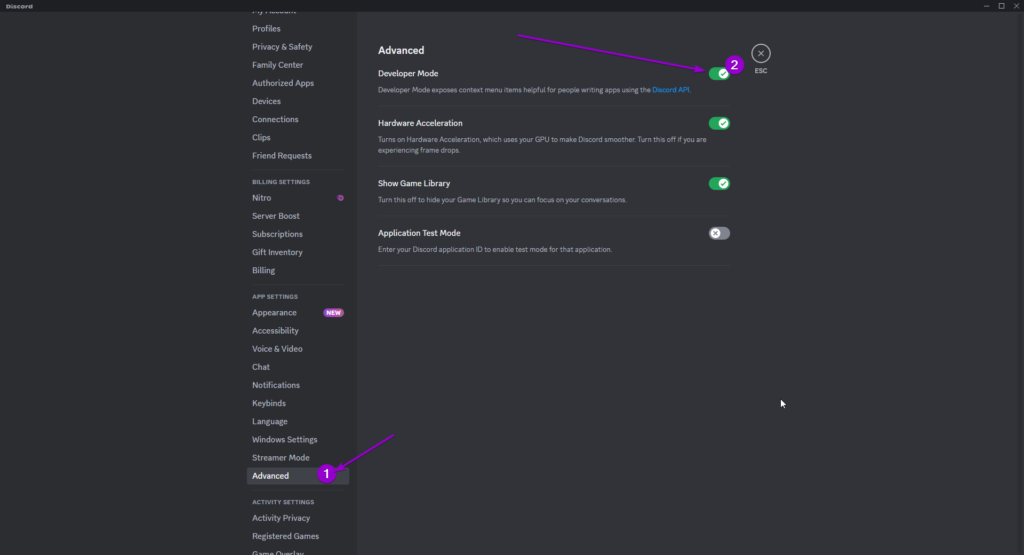
### 1. Open Discord and Go to Your User Settings

<figure><img src="https://1542229437-files.gitbook.io/~/files/v0/b/gitbook-x-prod.appspot.com/o/spaces%2Fu8TrWRyvdpP97AjvHh9W%2Fuploads%2Fgit-blob-68e4149170d104243371b96d2886d29172739128%2FDiscordUserSettingsPage.png?alt=media" alt=""><figcaption></figcaption></figure>

***

### 2. Go to the Advanced Page

Now then toggle the Developer Mode to be On.
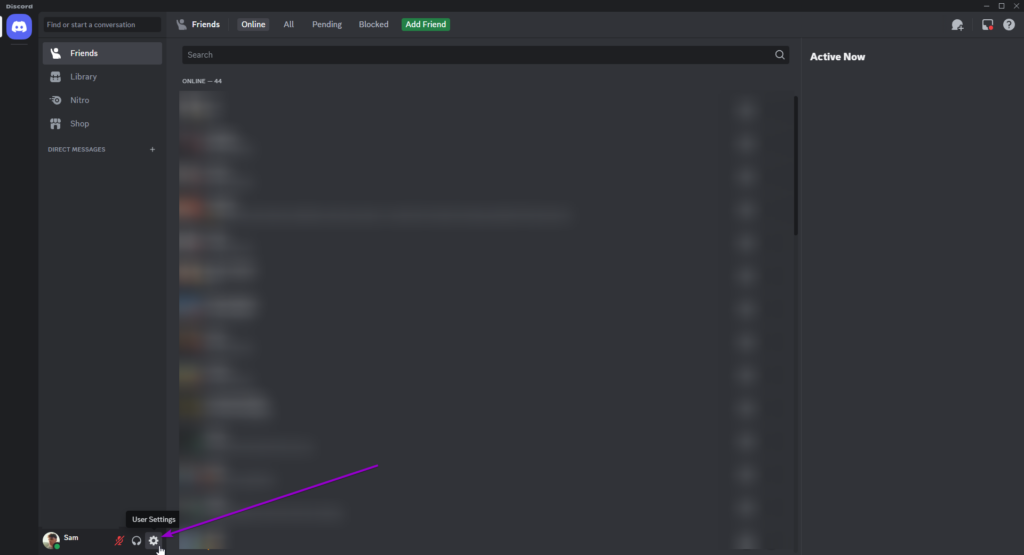
<figure><img src="https://1542229437-files.gitbook.io/~/files/v0/b/gitbook-x-prod.appspot.com/o/spaces%2Fu8TrWRyvdpP97AjvHh9W%2Fuploads%2Fgit-blob-ee04a6d07aa36f27af33ccb63b62b5a1f3caf4ad%2FdiscordAdvancedPageDeveloperModeOn.png?alt=media" alt=""><figcaption></figcaption></figure>